Disk Butler

Hollis, Disk Butler's mascot Hollis here. I'll show you exactly what's taking up space, and why.

See what's eating
your Mac's space.

Built for creators, gamers and developers: Steam leaves mods behind after a move, Xcode keeps simulators you forgot about, sound libraries and AI models pile up quietly. Disk Butler finds every gigabyte, explains whose it is in one plain sentence, and never deletes what it can't give back.

Free beta: scans and explains. For macOS 14 Sonoma and later, Apple silicon and Intel. Works offline — nothing leaves your Mac except an optional update check.

Disk Butler

Macintosh HD3 GB free of 245 GB
47 GB short of your goal (50 GB free).
External drive60 GB free of 1 TB
No goal set.
Free: see what's taking the space18 GB of Steam mods, 7.5 GB of simulators, and more
Pro: clean, move and automate itComing soon · one-time unlock


"Here's what I actually found — no guessing."

The space that went missing quietly

The biggest wins are rarely "junk". They're things that went wrong without telling you, and an ordinary cleaner doesn't know to look for them. From a real Mac Disk Butler was built on, found like this:

18 GB of Steam mods

Steam moved a game to an external drive and left its workshop mods behind on the Mac — a split install, not a leftover. Disk Butler tells you where they live and that the game is still using them.

11 GB of game files

A game's launcher keeps a huge cache on the Mac even though the game itself lives on another drive. Disk Butler names the launcher setting that moves it properly, instead of deleting blind.

7.5 GB of simulator runtimes

Xcode moved to an external drive; its iPhone simulator runtime didn't. Flagged for removal with Xcode's own tool, so Xcode never lists a broken one afterward.

Leftovers of apps you deleted

Uninstalling an app rarely removes its data. Disk Butler matches every folder back to the app that made it, and looks inside before it ever asks — a saved project in there is something you decide about, not something that vanishes.

AI model downloads

Local AI tools cache multi-gigabyte models under your home folder long after you've stopped using them. Disk Butler finds them by the tool that downloaded them, not by guessing from file size.

Sound libraries that can move

Kontakt, Toontrack and other sample libraries are often the single biggest thing on a producer's drive. Disk Butler can move one to an external drive and leave a link behind, so your instruments still find every sound.

"Your files are never 'junk' in my mouth, even the huge ones."

How it stays safe

Every finding sorts into one of three tiers. The tier decides what Disk Butler is even allowed to suggest — enforced in the app itself, not just in this copy.

Rebuilds itself

Developer and app caches

npm, Homebrew, pip, Xcode's derived data, dead simulators. The only tier Disk Butler can clean without asking — because the tool that made it rebuilds it automatically the next time it's needed.

Reinstallable

Split installs and leftovers

Steam mods on the wrong drive, leftovers of apps you uninstalled, old installers, simulator runtimes. Always asked first, and always sent to the Trash, never deleted outright.

Your files

Never removed

Your biggest folders, sound libraries, Voice Memos, Notes and Mail attachments. Disk Butler only ever offers to move these to a drive or show them in Finder — never delete.

What you'll see

A menu bar gauge you glance at, and a window with the detail when you want it.

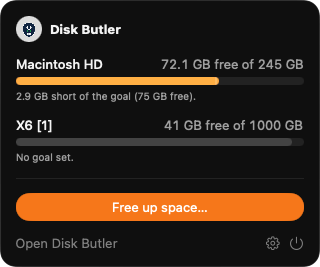
The Disk Butler menu bar gauge, showing free space per drive
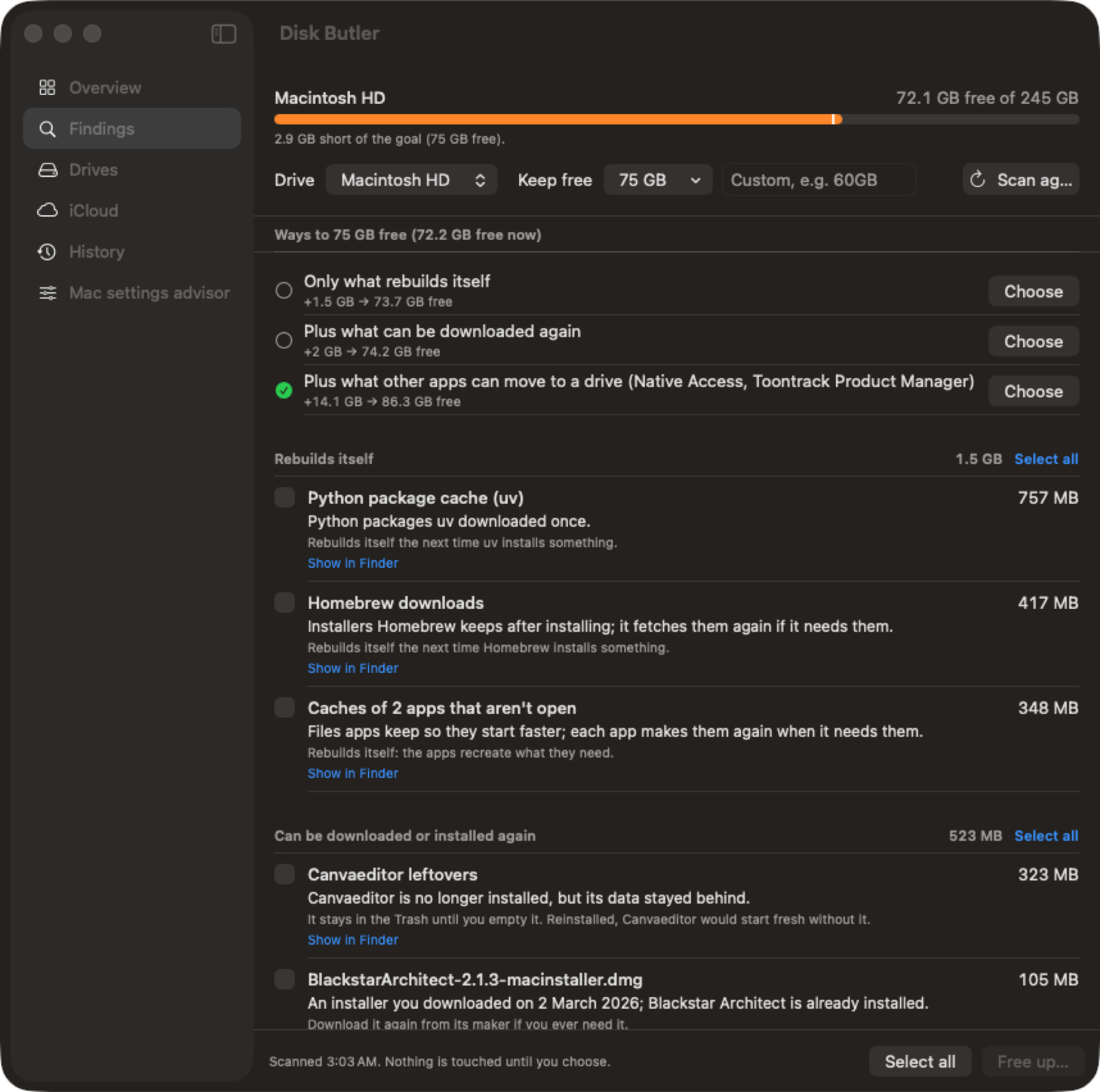
The Findings window, listing what Disk Butler found grouped by tier

"I can tell you what's there for free. Acting on it is Pro."

Free vs Pro

The beta is scan-only: Disk Butler shows you exactly what's taking space and why, for free, with no time limit. Acting on it — cleaning, moving and automating — is Pro, a one-time unlock, coming soon.

Free

Free, no account, no time limit

  • Full scan of every drive
  • Every finding, with its tier and a plain-English reason
  • Routes to a free-space goal, shown with sizes
  • The Mac settings advisor (what's on, what's off)
  • History of what Disk Butler has found

Pro

One-time price announced soon — not a subscription

  • Clean what's safe to clean
  • Move leftovers and sound libraries to a drive
  • Autopilot: keeps you above your goal automatically
  • iCloud-aware tools (still never touches iCloud itself)
  • Undo / Put Back from History

"Ready when you are."

Get the free beta

A 3.4 MB download, straight from this site. It isn't notarized yet, so macOS shows a warning the first time you open it — here's exactly why, and how to open it anyway.

Download Disk Butler (beta) macOS 14 Sonoma or later · Apple silicon and Intel
  1. Download and open the DMG, then drag Disk Butler into Applications.Same as any other Mac app.
  2. Open it once, and macOS will say it can't check it for malicious software.That's because Disk Butler isn't notarized yet — it hasn't been through Apple's automated scan. It's not a sign of anything found wrong; it just hasn't happened yet for this beta. We'll notarize it before a real release.
  3. Right-click (or Control-click) the Disk Butler icon in Applications and choose Open, then click Open Anyway in the dialog that appears.On newer macOS this button lives in System Settings → Privacy & Security, under "Security", if it doesn't show up in the dialog itself.
  4. That's it — only the first launch needs this.After that, Disk Butler opens normally like any other app.

Found a bug, or something that looks wrong? support@diskbutler.com — beta feedback goes straight to the person building this.

Questions people actually ask

Why does it ask for Full Disk Access?

Finding what's really taking space means reading folders macOS protects by default, including other apps' containers. Without Full Disk Access, those places are simply skipped and listed as skipped — Disk Butler still works, it just sees less.

Does it touch iCloud?

No. iCloud Drive, and the folders behind Desktop and Documents sync, are on a hard never-touch list in the code — never scanned, never suggested, never read — unless you explicitly turn on an iCloud-aware tool (Pro), and even that never deletes iCloud content itself.

What happens if it's wrong about something?

Almost everything Disk Butler acts on goes to the Trash first, or is copied and verified before the original is removed — so "wrong" means Put Back, not gone. The only things removed outright are caches the owning tool (npm, Homebrew, Xcode, and so on) rebuilds automatically the next time it's needed.

Does it phone home?

No. Disk Butler scans and acts entirely on your Mac. The only network request it ever makes is an optional check against this site's version file to tell you when an update exists — nothing about your files, your Mac, or you is sent anywhere.

Does it work on Intel Macs, or only Apple silicon?

Both. Disk Butler is a universal app, built and tested on Apple silicon and Intel.

What's the minimum macOS version?

macOS 14 Sonoma. Older versions aren't supported.